Showing posts with label BEST FREE Softwares. Show all posts

Thursday

Record Your Computer Screen & Make A Movie..

You can record video of the full desktop screen or just a portion. The application also supports Pan & Zoom so the recording area can easily follow the movements of your mouse cursor - very useful when making videos for the small screen like an iPod.

Another unique feature - it is possible record a remote computer screen with TipCam provided that computer is running the VNC server.

TipCam also provides an online space (250 MB) where your screencast videos are automatically uploaded after production.

http://planetofprince.co.nr/

While Jing and Camstudio render the desktop screen recording video in SWF format, TipCam uses Flash Video (FLV) which always find more convenient especially when the screencast size is more than a few hundred kilobytes.

DOWNLOAD This Amazing FREEWARE HERE -

FREEWARE - Multi Antivirus Scanning Tool

Multi AV Scanning Tool by David H. Lipman is a malware removal utility incorporating multiple command line scanners including McAfee, Sophos, Kaspersky and Trend engines.


Here is how to run Multi AV Scanning tool in your computer.
1. Download Multi_AV.exe from the link at the end of this article.

2. Run Multi_AV.exe (You must use the default folder C:\AV-CLS)

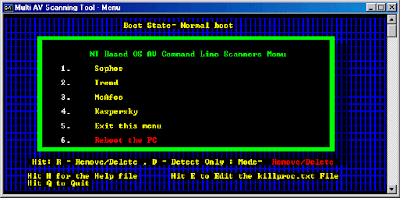
3. Run StartMenu.BAT or double-click on ‘Start Menu‘ shortcut from C:\AV-CLS folder.

There are two modes of operation: Remove/Delete and Detect Only. The software defaults to the Remove/Delete mode which means that any files that are deemed to be infected will be automatically removed from the system and can which can not be cleaned. If you desire to use the Multi AV Scanning Tool just to detect and not delete malware, you can hit the letter “D” and place the software in a Detect Only mode of operation. Those files found to be infected by malware will be logged but not cleaned nor deleted from the system. These two modes of operation are only for the McAfee, Sophos and Kaspersky modules since the Trend Micro Sysclean utility has a GUI selection for detection with or without file deletion.

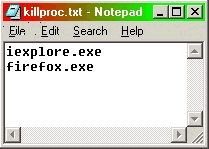
Included in the C:\AV-CLS folder is a file called killproc.txt and is used to shutdown or kill running processes prior to scanning the platform. There are two processes already in the text file. iexplore.exe (Internet Explorer) and firefox.exe (FireFox).


You can add more file names in the text file making sure the last line is a blank line. You can also bring up the killproc.txt text file by hitting the “E” key in Multi-AV menu.

http://planetofprince.co.nr/

Multi AV Scanning Tool website no longer accessible but it’s still a very good free multiple antivirus program that can be used to scan and remove viruses.

Note: The directory C:\AV-CLS is hard coded and should not be changed. Multi AV should be used to remove an infection from your computer. They are not a replacement for realtime antivirus protection but they are an effective tool to remove malware (viruses etc.) from an infected machine where antivirus software is disabled, out-of-date or even if it is not installed at all.


http://planetofprince.co.nr/


Download Multi Antivirus Scanning Tool HERE

Monday

Shut Down Your Computer Automatically

WinOff is an excellent piece of freeware which very simply shuts down your computer after a defined time so you don’t need to wait till the morning to attend to your PC.

3 Best Things..

1. It’s flexible. You don’t HAVE to shut it down. You can also schedule it to - restart, log off, suspend, hibernate or just lock the computer.
2. You get to see the last thing that happened before shutdown. There’s an option for capture a screenshot of the desktop right before the shutdown. With this, you can see if everything turned out OK before the PC shut itself down
3. Oh Yes.. Its FREEWARE... NO Cracks needed :)

Download HERE


Tuesday

Video Conversion Guide For Apple iPOD ?

Hello Friends, I have got many mails from people who owns iPOD. Many of them have a trouble converting video file to format which iPOD supports. iTunes can do the job, but still there are people who face problems with different formats. I am giving this information for such people who got problems in converting videos for iPOD.

I am going to use a FREEWARE Called - Jodix Free iPod Video Converter

Advantages of this software
Free, Simple interface, Amazing video and audio quality, Supports a variety of formats.

We all know that the iTune's in-built video converter has its problems and hence other developers have tried to create software that can provide better quality of service for the same. However, they're mostly trialware or shareware, which can either only convert half the video or only a certain amount of video files till it ceases to function.

The Jodix Free iPod Video Converter, is a free (yes, free!) software which can convert DVD/VCD, AVI, MPEG, WMV, RM, RMVB, DivX, ASF and VOB files to the MP4 format.
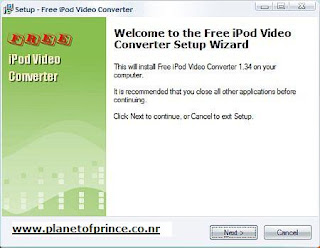


Here is the process on converting video.

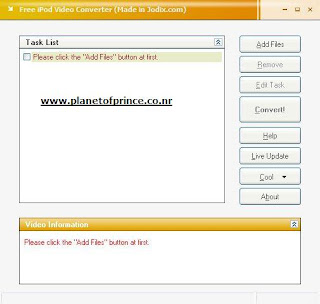
The main screen is nothing flashy-Its got the usual 'Add', 'Remove', 'Convert' Files, 'Help' and 'About' options. Along with these, you also have an 'Edit Task' option to make any changes to the files that have been made ready for conversion and the 'Live Update', which as the name suggests, provides updates for the software if any are available. They also have a 'Cool' option, which actually is an advertisement of their other software. That's all there is about the main screen.


Firstly, when you add a file for conversion, they provide its information in a small window which is connected to the converter. Once you're satisfied with the input info, click NEXT. Now this is where you can change the settings of the output file. You can select where the output file will be placed, its video resolution (don't change it from 320 x 240) as well as change its video and audio quality. Based on the settings you've changed, the output file info below it will change and give you an estimated file size of the output file.


the highest quality has been selected in all 3 cases. Also, after you select all the settings and click NEXT, you will get a 'Tag Editor' window. If you need to change the tag, you can do so here or else just click OK. Then all that's left is to click CONVERT.


Video 1

Size: 46.51 MB
Duration: 2:47
Format: *.avi


Video quality: 2000 kbps
Video Resolution: 320 x 240
Audio quality: 160 kbps
Estimated output file size : 45.53 MB
Output file size: 21 MB
Output Quality: Amazing


Video 2

Size: 349 MB
Duration: 46:22
Format: *.avi

Video quality: 2000 kbps
Video Resolution: 320 x 240
Audio quality: 160 kbps
Estimated output file size : 755.59 MB
Output file size: 364 MB
Output Quality: Amazing


Video 3

Size: 700 MB
Duration: 1:23:03
Format: *.avi

Video quality: 2000 kbps
Video Resolution: 320 x 240
Audio quality: 160 kbps
Estimated output file size : 1.5 GB
Output file size: 528MB
Output Quality: Amazing

There aren't many additional features in this software, but that's what makes it so simple. However, there are some which are worth mentioning. For example, while converting a file, you can hide the converter in the tray and summon for it with just a click on its system tray icon. It also supports batch file conversion, incase you plan to really load your iPod with a huge quantities of videos. One great feature that I find missing in softwares nowadays is the 'Automatic shutdown after conversion'. You can also pause a conversion at anytime.

Absolutely free! Overall, an amazing software and a definite must have for all 30GB and 60GB Video iPod users.

Download This TOTAL FREEWARE from here


DOWNLOAD Server 1

DOWNLOAD Server 2

There is
No Need to pay any money Or NO CRACK required for this software, As itz Freeware

Please let me know if anyone find any problem in converting video.

Saturday

Unlocker 1.8.1

Unlocker is a Windows Explorer extension allowing you with a simple right-click on a file or folder to get rid of error message such as error deleting file or folder, cannot delete folder: it's being used by another person or program. Simply right click the folder or file and select Unlocker. If the folder or file is locked, a window listing of lockers will appear. Select the lockers and click Unlock and you are done.

http://ccollomb.free.fr/unlocker/unlocker1.8.1.exe

DirectX 9.0c (DIRECT DOWNLOAD FULL)

This download provides the DirectX end-user multi-languaged redistributable that developers can include with their product. The redistributable license agreement covers the terms under which developers may use the Redistributable. For full details please review the DirectX SDK EULA.txt and DirectX Redist.txt files located in the license directory.

This package is localized into Chinese (Simplified), Chinese (Traditional), Czech, Dutch, French, German, Italian, Japanese, Korean, Polish, Portuguese (Brazil), Russian, Spanish, Swedish, and English.

DOWNLOAD FULL VERSION (FREEWARE) - You can use download accelerators.


http://download.microsoft.com/download/2/4/3/243865fc-c896-497e-9a66-bcc3f596741e/directx_feb2006_redist.exe

Google Translator Interface 1.0.010007

Google Translator Interface is a free and useful multilingual translation interface, that uses the Google translation engine. A powerful and easy to use assistant that satisfies your translation needs.

What's New in This Release:

· Because google has changed its translation response protocol

http://www.mcrenox.com.ar/downloads/gtrans.exe

Creative Sound Blaster Audigy 1, 2 and 4 series Driver 02.08.0004

This download contains an improved version of the drivers found on the Sound Blaster Audigy®, Audigy 2 series, and Audigy 4 series

installation CDs. It also supports Microsoft® Windows® XP Professional x64 Edition.

This download supports the following audio devices only:

* Creative Sound Blaster® Audigy including Platinum and Platinum eX series
* Creative Sound Blaster Audigy 2 including Platinum, Platinum eX, and Value series
* Creative Sound Blaster Audigy 2 ZS including Platinum and Platinum Pro series
* Creative Sound Blaster Audigy 4 Pro and Sound Blaster Audigy 4


http://files.europe.creative.com/manualdn/Drivers/AVP/9056/0xFDDCD16C/SBAX_WEBUP_LB_2_08_0004.exe

Windows XP Video Decoder Checkup Utility

The Windows XP Video Decoder Checkup Utility helps you determine if an MPEG-2 video decoder (also called a DVD decoder) is installed on your Windows XP computer and whether or not the decoder is compatible with Windows Media Player 10 and Windows XP Media Center Edition.

An MPEG-2 decoder is software that allows you to play DVDs and files that contain video content that was encoded in the MPEG-2 format (such as DVR-MS files, MPG files, and some AVI files). If you encounter a problem while using Windows Media Player 10 to synchronize (copy) recorded TV shows to a Portable Media Center or other device, use this utility to verify that you have a compatible MPEG-2 decoder installed on your computer.

Note: This utility only indicates whether an MPEG-2 decoder is compatible with the synchronization feature of Windows Media Player 10 or whether an MPEG-2 decoder is compatible with the recorded TV playback feature of Windows XP Media Center Edition.

This utility:
• Lists all the MPEG-2 video decoders that appear in your Windows registry (a database that contains information about the hardware and software installed in your computer).
• Indicates whether each decoder listed in the registry is marked as compatible with Windows XP Media Center Edition and whether any decoder listed in the registry is marked as the preferred video decoder.
• Indicates whether each decoder listed in the registry is marked as compatible with the synchronization feature of Windows Media Player 10.
• Lets you designate which installed decoder that you want Windows Media Player 10 to use when synchronizing DVR-MS files to a portable device. This is known as the preferred video decoder.
• Lets you undo any changes the utility makes to your Windows registry.

DOWNLOAD

http://www.microsoft.com/downloads/details.aspx?FamilyID=de1491ac-0ab6-4990-943d-627e6ade9fcb&DisplayLang=en
OR
http://download.microsoft.com/download/9/b/2/9b276571-80d5-43ca-806f-d68fca4b4e89/DECCHECKSetup.EXE

AMD Power Monitor 1.0.1

AMD Power Monitor is used to monitor the current frequency, voltage, utilization, and power savings of each core of each processor in a system.

AMD Power Monitor has a system tray icon that may be used to view or select power schemes on the system. The system tray icon will show the average utilization of every core on the system

Requirements:

· Microprocessor: AMD Athlon 64 processor, AMD Opteron processor, AMD Sempron Processor or better.
· Memory: 128 MB RAM or more.
· Hard Drive: 2 GB free space or more.
AMD Power Monitor installs and operates under the following operating systems
· Microsoft Windows XP
· Microsoft Windows XP Professional x64 Edition
· Microsoft Windows Server 2003 32-bit
· Microsoft Windows Server 2003 64-bit

DOWNLOAD

http://www.amd.com/us-en/assets/content_type/utilities/powersetup.exe

How to increase your hotmail inbox size up to 250MB??

As we all know that Hotmail has been in process of upgrading its free accounts to 250 MB. Some of us have already got their accounts upgraded but most of the people are still having 2 MB of space. So here is a small process to upgrade your account. Initially it will be upgraded to 25 MB and after 30 days it will be upgraded to 250 MB.


1) Login ur hotmail account and go to options.

2) Go to "Personal"

3) Click "My Profile"

4) Change Country to "United States" Wait for browser to load United states settings.

5) Change the state to "Florida" and zip code "33332"

6) Click "update"

7) Click "Continue"

8) Go to "Language" and make sure its "English"

9) To preserve your emails in your inbox, create a temporary folder and put all your emails from your inbox into that.

10)Paste this link in the same browser.
CODE
http://by17fd.bay17.hotmail.msn.com/cgi-bin/Accountclose


11) Wait until the Screen says you're Hotmail is Closed and ready to be deleted. Click "Close Account".
Go back to login page and relogin to ur hotmail account..!!

12 ) Your account size will now increase to 25 MB which a mnth later becomes 250 mb.

NOTE from PRINCE - I have my 2 Hotmail IDs at 250 MB now. If anyone face a problem

Please mail me at - planetofprince AT yahoo.com

Bandwidth Monitoring tool

Speed Meter Pro is a free bandwidth monitoring tool that lets you track your overall internet bandwidth usage. This application is great for checking if you are getting the bandwidth promised by your ISP. It provides real time reporting of your download and upload rates and also the peak rates achieved. It can also be used as a diagnosis tool if you feel that your internet speed is slower than what it should be.


Download (FREEWARE)
http://www.speedmeterpro.com/SpeedMeterPro.2.2.6024.5-ship-Main.msi

Weather Watcher


Weather Watcher can be best described as the weather bureau at your finger tips. It allows you to automatically retrieve the current weather conditions as well as hourly/daily forecast, temperature, weather alerts and weather maps for over 77,000 cities world-wide. The weather info is also displayed in the system tray as a tooltip. Thanks to this tool, you can have a weather map as your desktop wallpaper, log or export the weather data in any format and customize the look of the interface using skins.

http://www.download.com/3000-2381_4-10502042.html?tag=sd.EXAF


Record Songs from Raaga.com


AudioMagic is a real-time MP3 recording and playback software. Songs from an Internet broadcast or an Audio CD can be automatically recorded and saved individually. It can convert analog format of your LP records/cassette tapes into digital format. It is also capable of converting your WAV files to MP3 and vice versa and a lot more.

http://www.yogen.com/dl/YoGenAudioMagic.zip

Winamp 5 Full 5.13

Nullsoft Winamp is a fast, flexible, high-fidelity media player for Windows. Winamp supports playback of many audio (MP3, OGG, AAC, WAV, MOD, XM, S3M, IT, MIDI, etc) and video types (AVI,ASF,MPEG,NSV), custom appearances called skins (supporting both classic Winamp 1.x/2.x skins and Winamp 3 freeform skins), audio visualization and audio effect plug-ins (including two industry dominating visualization plug-ins), an advanced media library, Internet radio and TV support, CD ripping, and CD burning. The Full version Plays MP3s, AAC, WMA, and more; Compatible with Winamp 2 Plug-ins; Full Support for Classic and Modern Skins; Plays Videos; has a Powerful Media Library; Browse Internet Radio & TV Stations; Integrated Internet Music Videos & Songs; Bundled Visualizations; and Burn & Rip CDs.

http://download.nullsoft.com/winamp/client/winamp513_full_emusic-7plus.exe

Media Player Classic For Win 2K/XP


Media Player Classic is an extremely light-weight media player for Windows. It looks just like Windows Media Player v6.4, but has many additional features. It has a built in DVD player with real-time zoom, support for AVI subtitles, QuickTime and RealVideo support (requires QuickTime and/or Real Player), and lots more.

http://ufpr.dl.sourceforge.net/sourceforge/guliverkli/mpc2kxp6487.7z

IrfanView - Best too to view Photos


IrfanView is a fast, simple freeware image viewer and editor that supports all major graphic formats, including BMP, DIB, JPEG, GIF, animated GIF, PNG, PCX, multipage TIFF, TGA, and more. In addition, it features drag-and-drop support, directory viewing, TWAIN support, slide shows, batch conversion, and modifications such as color depth, crop, blur, and sharpen.

http://fileforum.betanews.com/sendfile/967963863/1/iview398.exe

Record Video Chat of Messenger


CamStudio is able to record all screen and audio activity on your computer and create AVI video files and using it’s built-in SWF Producer can turn those AVIs into streaming Flash videos. You have total control over the output of your video: you can choose to use custom cursors, to record the whole screen or just a section of it and can reduce or increase the quality of the recording depending on if you want smaller videos (for emailing to people, for instance) or you can have “best quality” ones for burning onto CD/DVD. It can also add anti-aliased screen captions to your recordings with the Video Annotation feature you can even personalise your videos by including a Web cam movie of yourself “picture-in-picture” over your desktop

http://surfnet.dl.sourceforge.net/sourceforge/camstudio/Camstudio-2.0-w32.zip

Best TV Tuner Card Software

ChrisTV can control your TV Tuner Card. TV on your PC with high quality image and sound. Supports all TV Cards based on BT8×8 chipset, Philips SAA713x chipset, Conexant CX23881, also works with any Capture Device but only in preview mode.

http://download.betanews.com/download/1064339413-3/setup_christv_4_80_lite.exe

iPOD Song Transfer

YamiPod is a freeware application to efficiently manage your iPod under Mac OS X, Windows and Linux. It can be run directly from your iPod and needs no installation. It can also help you to rebuild the music library.

http://www.pochoirs.de/leechs/yam/yamipod/yam-win.zip